> For the complete documentation index, see [llms.txt](https://help.digits.com/llms.txt). Markdown versions of documentation pages are available by appending `.md` to page URLs; this page is available as [Markdown](https://help.digits.com/firms-connections/finch.md).
# Payroll Connections
Connect your payroll provider to Digits to automatically sync payroll data — no manual journal entries needed.
***
Digits supports a wide range of payroll providers, giving you flexibility to connect to the system you're already using.
### Supported Payroll Providers
Digits currently supports the following providers:
{% columns %}
{% column %}
* ADP Run
* ADP Workforce Now
* AlphaStaff
* Counter Point HCM
* ECCA
* Heartland
* Justworks
* OnPay
* Paychex Flex
* Paycom
{% endcolumn %}
{% column %}
* Paycor
* Payday Payroll
* Paylocity
* Proxus HR
* QuickBooks Online Payroll
* Sequoia One
* Square Payroll
* TriNet HR Platform (fka Zenefits)
* UKG Pro
{% endcolumn %}
{% endcolumns %}
***
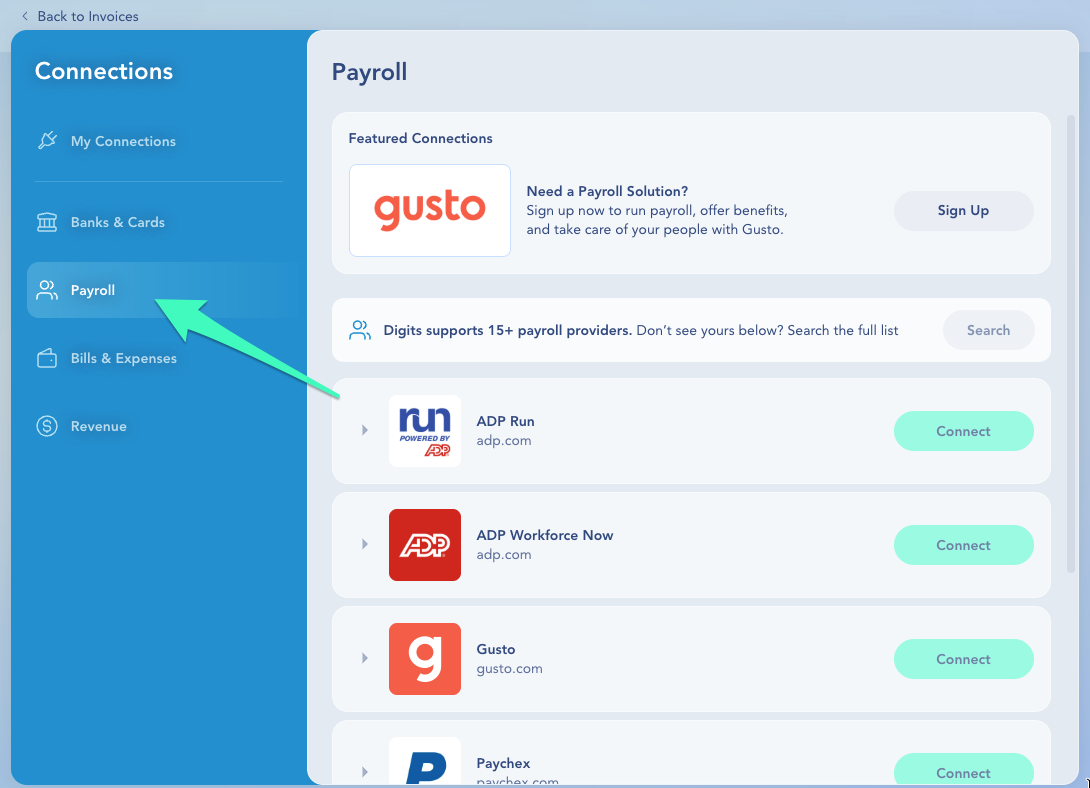
### How to Connect Your Payroll Provider
1. In the left navigation, click **Connections**.
2. Click the **Payroll** tab.
3. Find your payroll provider in the list or use the search function at the top.
4. Click **Connect.**
5. In the pop-up window, log in using your payroll admin credentials and authorize the connection.
6. Back in Digits, go to the **Manage Connections** settings for the new connection.
7. Choose an import start date to decide how far back you want to pull payroll history.
8. Review the settings and click to confirm.
✨ Digits will automatically begin syncing payroll transactions from your provider.
#### What Happens After You Connect
Digits will:
* Import historical payroll transactions from your provider based on your start date
* Begin syncing new payroll activity automatically
* Start an automatic sync to keep everything up to date
{% hint style="info" %}
**Note:** Import time varies depending on the volume of payroll data from your provider.
{% endhint %}
***
### Frequently Asked Questions
A payroll provider I need isn't listed. Can I request it?
Yes! Through our integration partner Finch, we have access to additional providers with more involved onboarding requirements. If you're willing to test with us, let us know — we're happy to explore enabling it. Contact us at .
Do I still need to record manual payroll if my provider is supported?
No. Once connected, payroll syncs automatically. Manual payroll entries are only needed if your provider is not yet supported. See: [Recording Manual Payroll in Digits](/firms-connections/manual-payroll.md)
***
{% columns %}
{% column width="66.66666666666666%" valign="middle" %}
Got a question or feedback? Our team is all ears—come say hello!
{% endcolumn %}
{% column width="33.33333333333334%" valign="middle" %}
Contact Digits Support
{% endcolumn %}
{% endcolumns %}
***
---
# Agent Instructions
This documentation is published with GitBook. GitBook is the documentation platform designed so that both humans and AI agents can read, navigate, and reason over technical content effectively. Learn more at gitbook.com.
## Querying This Documentation
If you need additional information that is not directly available in this page, you can query the documentation by asking a question.
Perform an HTTP GET request on the following URL with the `ask` and `goal` query parameters:
```
GET https://help.digits.com/firms-connections/finch.md?ask=&goal=
```
`ask` is the immediate question: it should be specific, self-contained, and written in natural language.
`goal` is what the user is ultimately trying to achieve, the reason they need the answer. Sharing it helps GitBook give you a better, more relevant answer. A goal is most helpful when it describes the outcome the user wants rather than restating the question. For example, with `ask=how do I create an API token`, a goal like `automate deployments from our CI pipeline` lets GitBook tailor the answer to that use case.
The response will contain a direct answer to the question and relevant excerpts and sources from the documentation.
Use this mechanism when the answer is not explicitly present in the current page, you need clarification or additional context, or you want to retrieve related documentation sections.