Document Requirements for Verification
Digits verifies your identity and business information to keep your account secure and compliant with US regulations. In most cases, verification happens automatically based on the information you provide. However, if automatic verification is unsuccessful, you may be asked to upload additional documents.
This guide explains what documents may be required and how to prepare them for upload.
Overview
Depending on your account type, you may need to provide documents for:
Photo ID
Registration Document
Proof of Tax ID
Proof of Business Address
Proof of Residential Address
Proof of Tax Information
Proof of National ID Number
Proof of Ownership
Proof of Source of Funds
Proof of Industry
Proof of Source of Wealth
Proof of Source of Funds
Proof of Source of Wealth
For all accounts: Bank Statement (if bank account verification fails)
General Upload Requirements
All uploaded documents must meet these specifications:
File formats
JPEG, JPG, PNG, or PDF
PDF size
1 KB – 15 MB
Image size
100 KB – 15 MB
Maximum pages
15 pages (for PDFs)
We cannot accept:
Edited or digitally altered documents
Documents older than 12 months (unless otherwise specified)
Blurry, cut-off, or low-quality images
Documents with missing required information
Screenshots of documents (unless specifically permitted)
Bank Statement
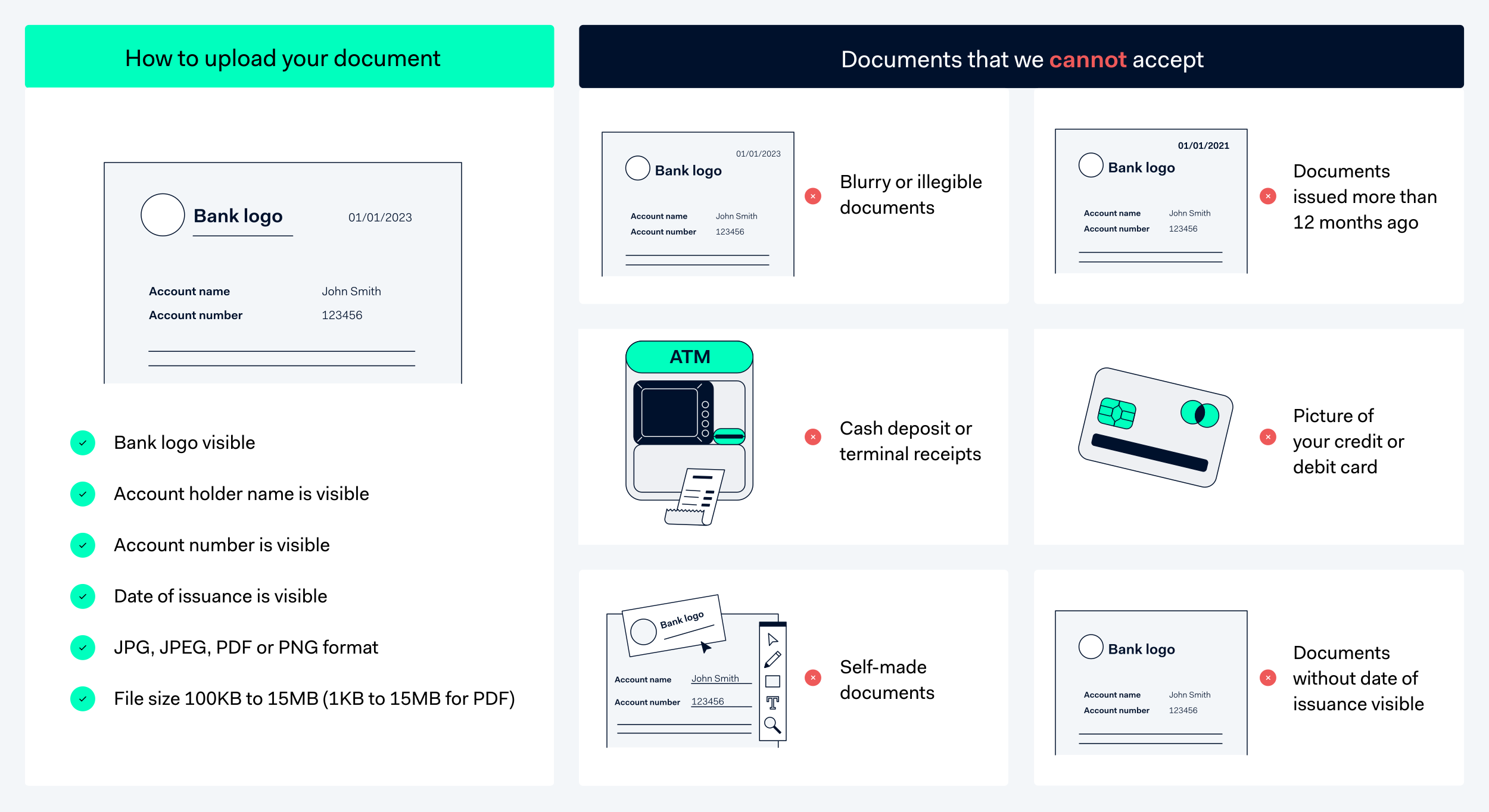
If automatic verification of your bank account fails, you'll need to provide proof of bank account ownership.
Accepted Documents
Bank statements
Deposit tickets or deposit forms
Screenshots of your online banking environment
Official letters issued by your bank
Checks (with specific requirements below)
Requirements
Your bank document must clearly show:
Account holder name — Must match your legal business name or trading name (DBA) exactly
Account number or routing number — Fully visible
Date of issuance — Within the last 12 months
Bank identification — Logo or bank name in official font
Special Requirements for Checks
Account holder name, account number, and bank name must be printed (not handwritten)
Security features must be visible
Account and routing numbers must be fully visible
We cannot accept starter checks or temporary checks
What We Cannot Accept
Photos of debit or credit cards
Documents from third-party financial software
Statements older than 12 months
Documents without bank identification
Photo ID
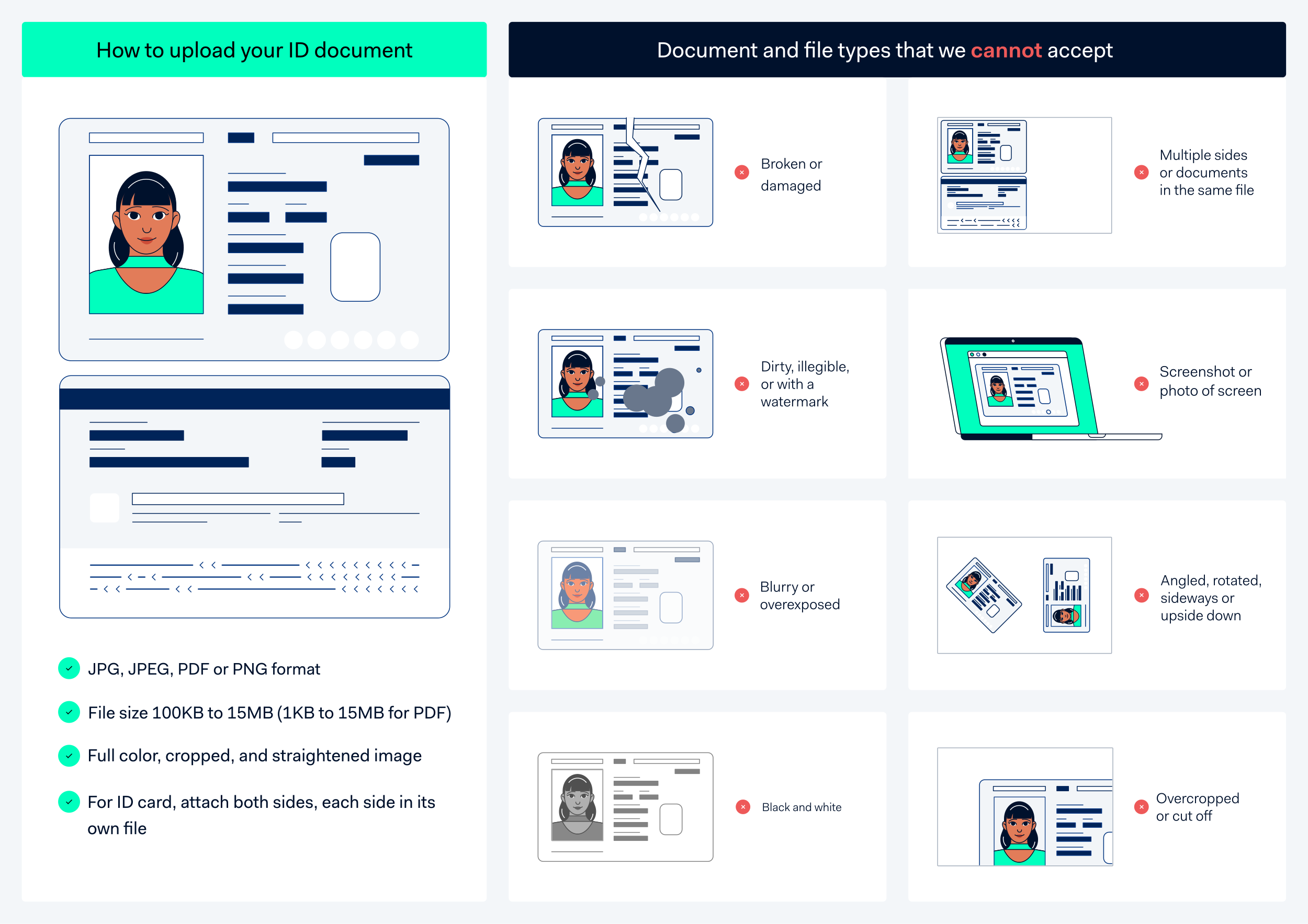
If automatic identity verification fails, you'll need to upload a government-issued photo ID.
Accepted Documents
Passport
Data page (photo, MRZ code, and personal details)
Driver's License
Front AND back (as separate images)
State ID Card
Front AND back (as separate images)
Requirements
Your photo ID must:
Be non-expired
Show the machine-readable zone (MRZ) if present
Be a physical document (not a digital ID)
Be signed if there's a signature field
Have first and last name matching exactly what you provided during signup
Image Quality Requirements
Full color — No black and white images
Straightened — All corners and edges fully visible
Photo or scan of the physical document
What We Cannot Accept
Digital IDs or mobile driver's licenses
Screenshots of photos
Photos of screens or printouts
Photos pasted onto other documents
Expired documents
Name Mismatch? If your legal name has changed (e.g., after marriage), your photo ID name must still match what you provided during signup. Contact support if you need to update your registered name.
Proof of Individual Tax ID
If automatic tax ID verification fails, you'll need to upload an official tax document.
Accepted Documents
Your document must contain one of the following tax identification numbers and your name:
Social Security Number (SSN)
9-digit number issued to US citizens and residents
Employer Identification Number (EIN)
9-digit number for business entities
Individual Taxpayer Identification Number (ITIN)
9-digit number for individuals not eligible for SSN
Examples of Acceptable Documents
IRS correspondence showing your SSN, EIN, or ITIN
Social Security card
EIN Confirmation Letter (CP 575)
Tax return documents
W-2 or 1099 forms
Constitutional Document (Sole Proprietorships)
If you operate as a sole proprietor and automatic verification fails, you may need to provide a constitutional document.
Accepted Documents for US Sole Proprietors
SS-4 Confirmation Letter
IRS acknowledgment of your EIN application
Schedule C
Profit or Loss from Business (from your tax return)
EIN Confirmation Letter (CP 575)
Official IRS letter confirming your EIN
DBA Filing
"Doing Business As" or Fictitious Name filing
Requirements
Issued within the last 12 months, OR
Contains a signature and date not older than 12 months
Registration Document (Organizations)
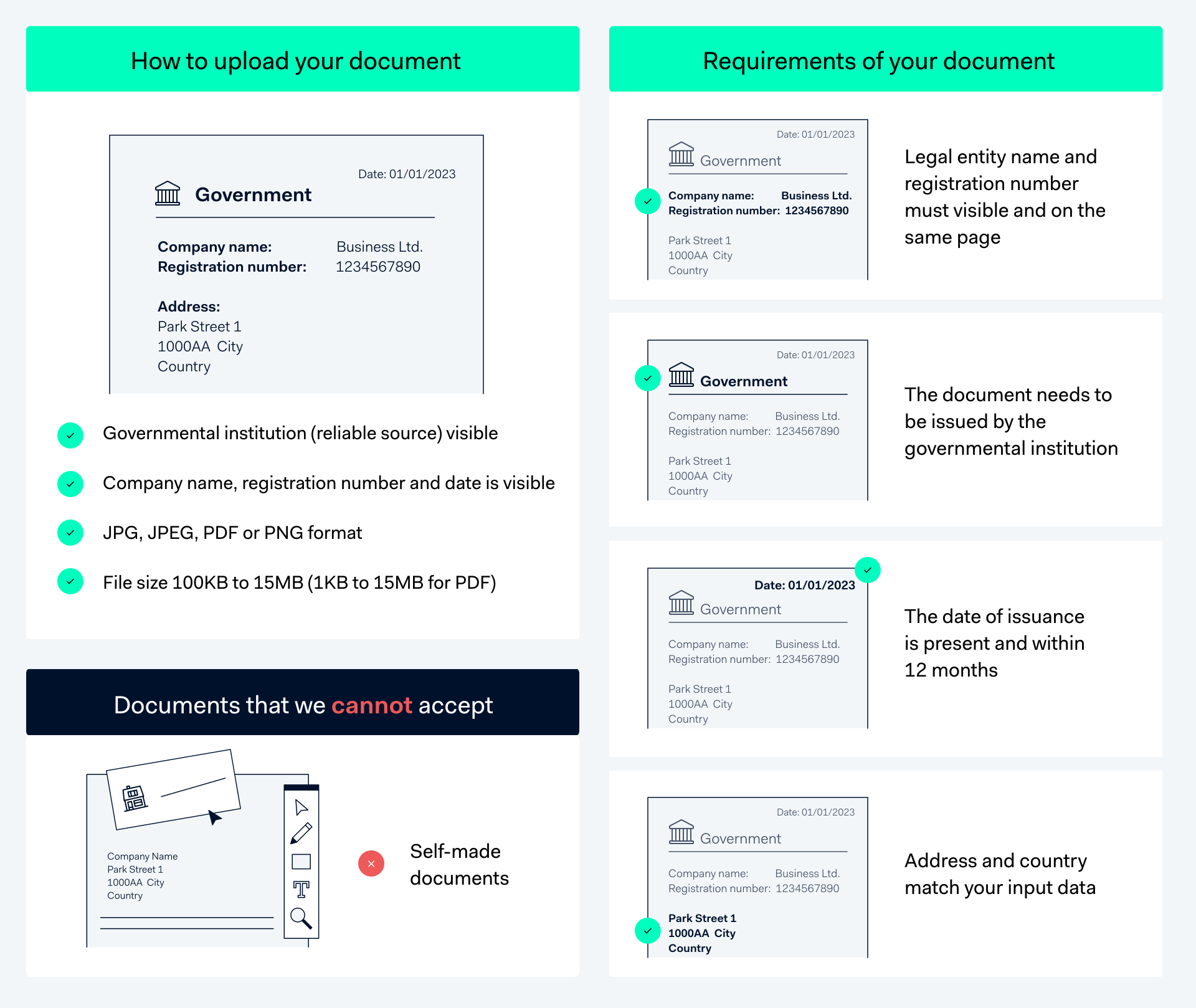
If automatic verification of your business fails, you may need to provide an official registration document.
Requirements
Your registration document must be:
Issued by a government agency or official registry
Issued within the last 12 months, OR contain a signature and state of affairs dated within the last 12 months
Show your legal business name and registration number
Examples of Acceptable Documents
Articles of Incorporation
Certificate of Formation (LLC)
Certificate of Good Standing
Business License
State registration certificate
Proof of Business Address
If automatic address verification fails for your organization, you'll need to provide proof of your business address.
Requirements
The document must be:
Issued by a reliable, independent source (government agency, utility company, financial institution)
Issued within the last 12 months
Show your complete business address
Examples of Acceptable Documents
Utility bills (gas, electric, water, internet)
Bank statements
Government correspondence
Lease or rental agreements
Official business registration showing address
Proof of Residential Address
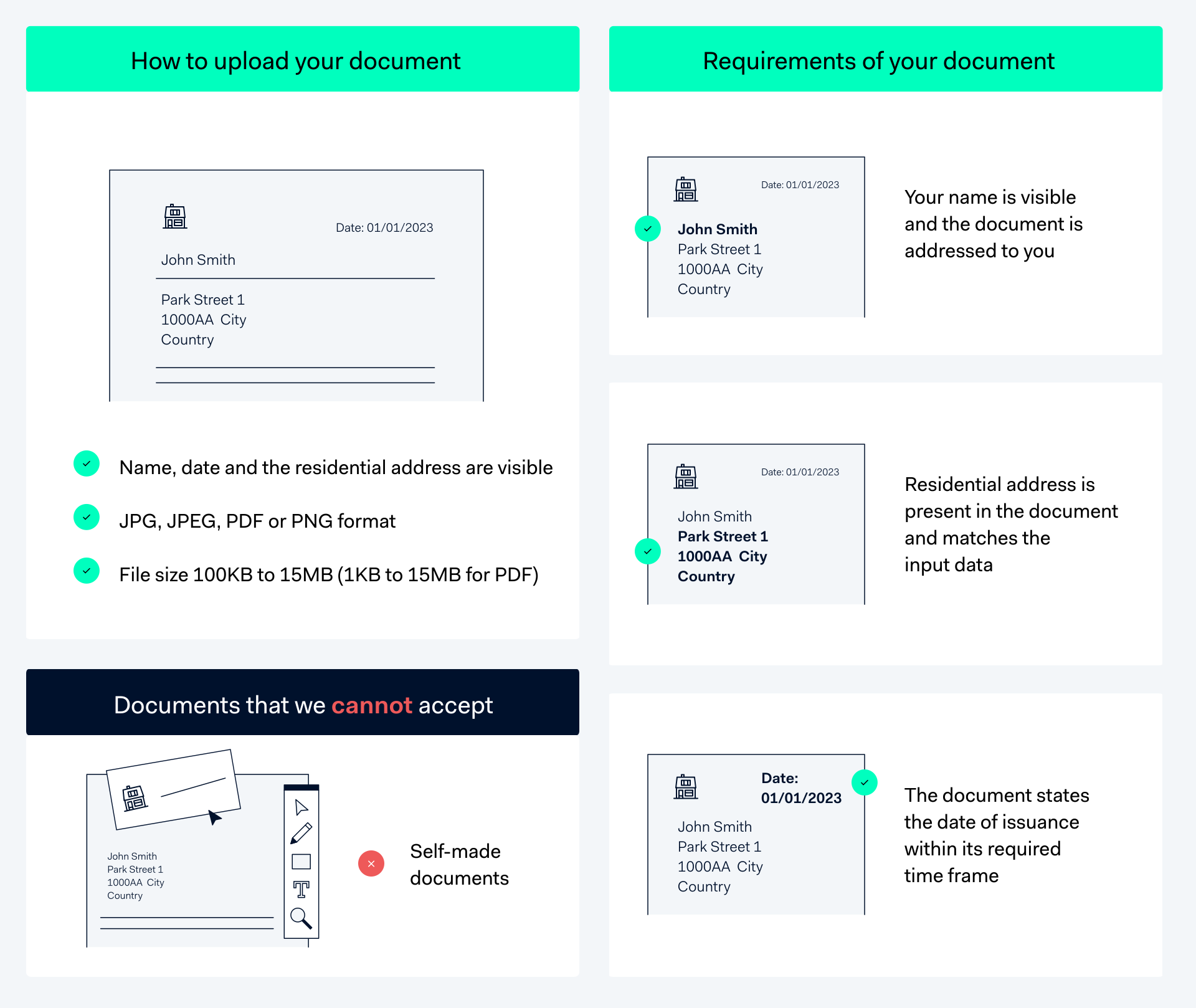
If automatic verification of your residential address fails, you'll need to provide proof of your address.
Document Age Requirements
3 months
Bank statement, Utility bill (gas, water, electric, internet), Tax document, Salary slip, Employment contract, Government correspondence
12 months
Mortgage statement, Voter registration certificate
Requirements
Your document must show:
Your full name
Your complete residential address (including state)
Date within the required timeframe
Proof of National ID Number
If automatic verification of your national ID number fails, you'll need to provide documentation.
Requirements
Your document must:
Show your full name
Show your national ID number (SSN for US individuals)
Be issued by a government agency
Proof of Organization Tax Information
If automatic tax verification fails for your business, you'll need to provide proof of your business tax ID.
Requirements
The document must:
Be issued by a government or tax authority
Show your legal entity name (not just DBA/trading name)
Show your tax ID number (EIN)
Show country of registration
Be dated within the last 12 months, OR be signed and dated by a legal representative within the last 12 months
Examples of Acceptable Documents
IRS EIN Confirmation Letter (CP 575)
IRS tax correspondence
State tax registration documents
Important: Your "Doing Business As" (DBA) or trading name cannot be accepted as your legal entity name. Make sure to provide documents showing your official legal business name.
Proof of Ownership
If verification of your business ownership structure fails, you may need to provide proof showing who owns and controls your company.
Required: Ownership and Control Chart
You must provide a visual diagram showing:
Complete ownership structure, including all intermediate companies
Legal entity name, structure, and state for every entity
Ownership percentages between entities
Ultimate Beneficial Owners (UBOs) — individuals who own 25% or more
Signature, name, title, and date (within last 6 months)
Supporting Documents
In addition to the ownership chart, you may provide:
Securities or shareholder register
Articles of incorporation
Annual reports
Certificate of Corporate Status
Shareholder agreements
Partnership agreements
Board meeting records
Certificate of incumbency
Document Requirements
Supporting documents must:
Include information about UBOs and all intermediate entities
Be dated within the last 6 months
Be issued by an external/official source
Proof of Source of Funds
You may be asked to verify the source of funds being used in your Digits account.
Required Information
Business profits
Description of your industry and business model
Latest audited accounts, annual statements, or letter from a regulated accountant detailing profits over the last 2 years
Proof of Source of Wealth
For certain accounts, you may need to document the total amount and sources of your wealth.
Documentation by Wealth Source
Business profits
Industry and business description
Audited accounts, annual statements, accountant letter
Employment/Salary
Role, salary, employer details, employment dates
Pay stubs (last 3 months), contract, tax documents, bank statements showing salary deposits
Inheritance
Date received, amount, relationship to benefactor
Grant of probate with will, tax document, bank statement, solicitor's letter
Rental income
Annual amount, property address
Proof of ownership, tax document, rental agreement
Capital gains/Dividends
Annual amount, investment description, holding period
Tax document, investment statement, confirmation letter
Asset sale
Sale date, amount, asset type, holding period
Sale contract, solicitor letter, bank statement, title deed
Loans
Loan date, amount, lender info, purpose, duration
Loan agreement, recent loan statement
Gifts/Donations
Date, amount, donor info, reason, relationship
Letter from donor confirming gift and source of funds
Lottery/Betting winnings
Date, amount, source
Tax document, bank statement, proof from lottery/casino
Proof of Industry
If industry verification fails, you may need to provide documentation showing your business classification.
Acceptable Documents
Any document that includes an official industry code:
Tax documents showing industry classification
Registration documents with industry codes
SIC code documentation
Your proof of industry can often be satisfied by documents you've already provided, such as tax information or registration documents, if they include industry classification codes.
Need Help?
If you have questions about document requirements or need assistance with verification:
Review the specific requirements for your document type above
Ensure your documents meet all format and quality standards
Contact Digits support at [email protected] if you're unsure whether a document will be accepted
Tip: Before uploading, double-check that your document is clear, complete, shows all required information, and meets the file size requirements.