> For the complete documentation index, see [llms.txt](https://help.digits.com/llms.txt). Markdown versions of documentation pages are available by appending `.md` to page URLs; this page is available as [Markdown](https://help.digits.com/business-connections/bill.md).

# Digits Connections: BILL

***

### Sync Overview

The following diagram shows what data syncs between BILL and Digits and the direction of each sync.

<div align="left"><figure><img src="/files/JxdyPfUMbrkkdzMBiQ72" alt=""><figcaption></figcaption></figure></div>

***

### Before You Connect

Before connecting BILL:

* You must be a BILL administrator.
* You must have permission to create Sync Tokens in BILL.
* If reconnecting BILL, disconnect any previous integration first (if applicable).

***

### How to Connect to BILL

{% hint style="danger" %}
Warning: You will need administrator privileges in BILL in order to connect.
{% endhint %}

To connect a BILL account:

1. From the left navigation menu, click **Connections**&#x20;
2. Click the **Bills & Expenses** tab
3. Find **BILL** and click **Connect**
4. Log in to your **BILL account** to generate a **Sync Token**

***

#### How to Generate a Sync Token in BILL

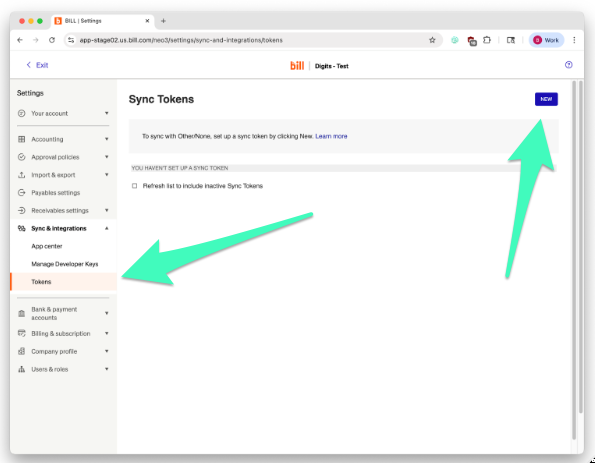
1. In BILL, go to **Settings → Sync & Integrations → Tokens.**
2. Click **New.**

<div align="left"><figure><img src="/files/A0Ywk01OKktur7DNQD4M" alt="" width="446"><figcaption></figcaption></figure></div>

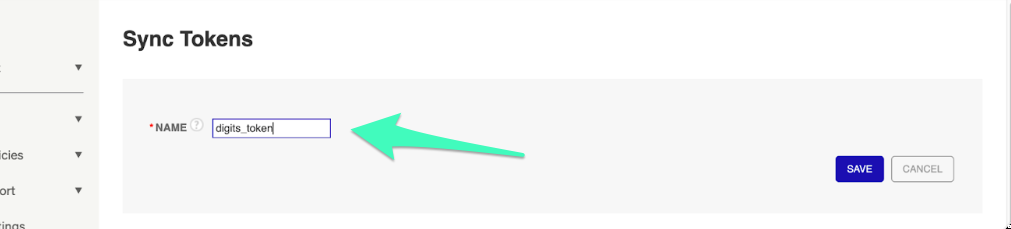
3. Enter a **Name** for the Token, then click **Save.**

<div align="left"><figure><img src="/files/iJUvhvrKPhgc5vy22RTB" alt="" width="563"><figcaption></figcaption></figure></div>

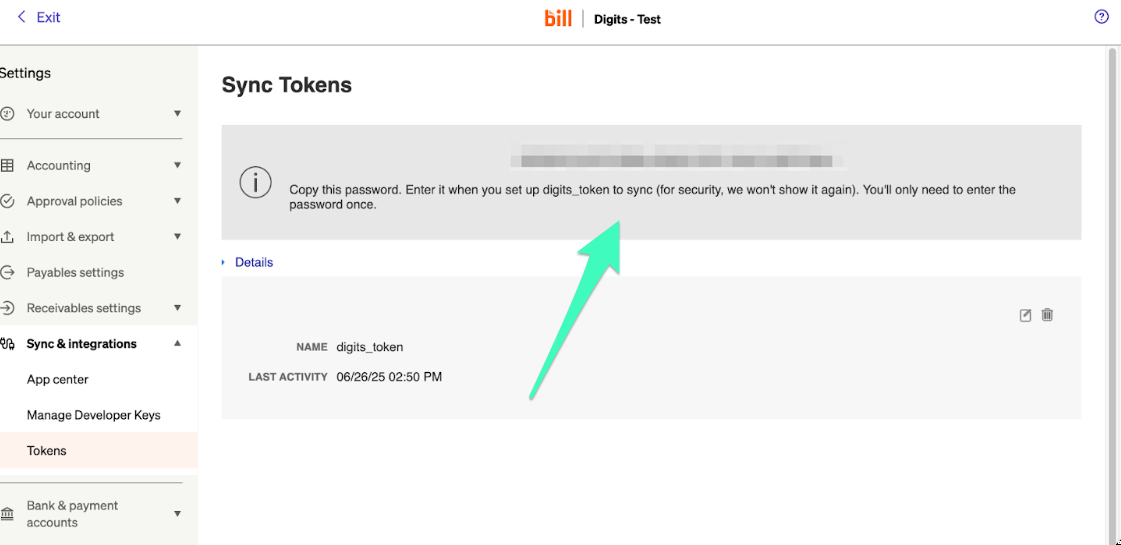
4. Copy the **Token Name** and **Token Password.**

{% hint style="danger" %}
**WARNING:** Save **Token Name** and **Password** before leaving the page—they’re only shown once:exclamation:
{% endhint %}

<div align="left"><figure><img src="/files/70VdKTcPH5EckpuBv589" alt="" width="563"><figcaption></figcaption></figure></div>

Then, back in **Digits:**

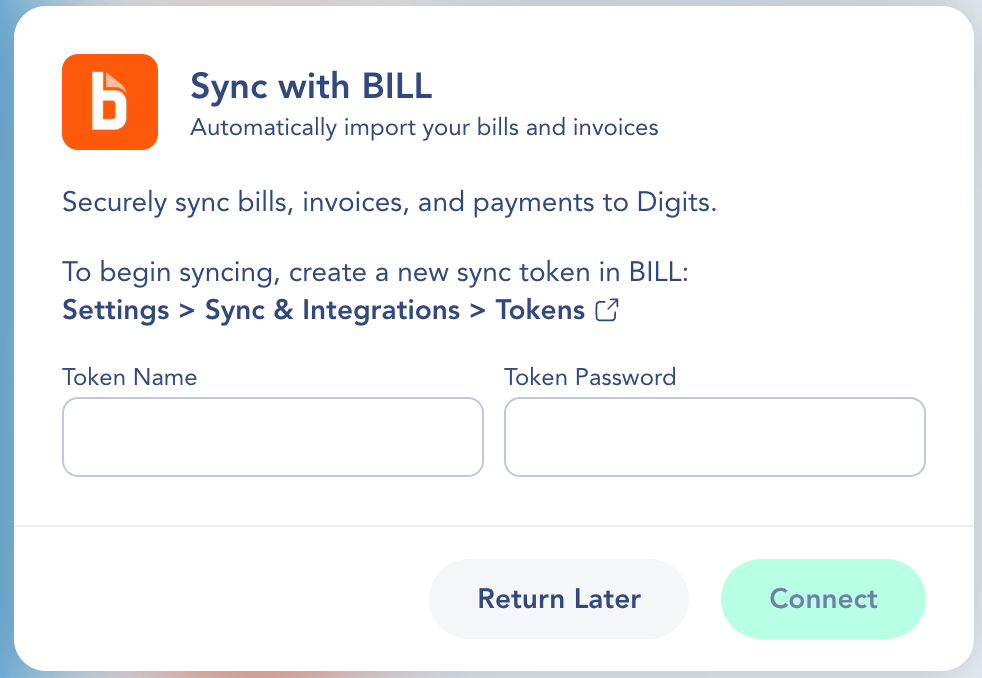
5. Enter the **Token Name** and **Token Password** in Digits.

<div align="left"><figure><img src="/files/X0MSP9O1GugtZXp0ZlEF" alt="" width="375"><figcaption></figcaption></figure></div>

6. Click **Connect.**
7. Once connected, Digits begins syncing data automatically.

{% hint style="warning" %}
&#x20;**If you already created a Sync Token before:**\
BILL will show only the *Token Name* — not the password.\
To get a new Token Password, you’ll need to **create a new Sync Token** (repeat step 1).

![](/files/q608OhzI2PQK5JhZuqmM)
{% endhint %}

***

### What Happens After Connection

Once connected, **✨**&#x44;igits will automatically:

* Import your full transaction history from BILL
* Sync new bills, invoices, and payments automatically
* Automatically categorize and assign parties&#x20;
* Start a sync to keep the Ledger updated

{% hint style="info" icon="clock" %}
Import time may vary based on the data volume and activity in BILL.
{% endhint %}

***

### Frequently Asked Questions

<details>

<summary>Why don’t I see older transactions in Digits?</summary>

Digits imports all historical transactions available through the BILL API. If data appears missing, verify that the transaction history is accessible in your BILL account or re-sync from your dashboard.

</details>

<details>

<summary>What is a Sync Token?</summary>

A Sync Token is a name and password pair used only for syncing BILL with other platforms—it can’t be used to log into your BILL or Digits account.

</details>

<details>

<summary>What should I do if the BILL connection stops syncing?</summary>

Reconnect from the **Connections** tab in your dashboard. If errors persist, contact Digits Support at [help@digits.com](mailto:).

</details>

<details>

<summary>Will my BILL categories and GL coding carry over into Digits?</summary>

No. Digits does not sync or map category/GL coding data from BILL. Instead, Digits uses its own AI-based approach to automatically categorize imported bills and payments. If a transaction is categorized differently from what you expected, you can update it directly in the Digits Ledger.

</details>

***

{% columns %}
{% column width="66.66666666666666%" valign="middle" %}
Got a question or feedback? Our team is all ears—come say hello!
{% endcolumn %}

{% column width="33.33333333333334%" valign="middle" %}

<p align="center"><a href="https://portal.usepylon.com/digits/forms/get-in-touch-with-digits-support" class="button primary" data-icon="envelope-open-text">Contact Digits Support</a></p>
{% endcolumn %}
{% endcolumns %}

***


---

# Agent Instructions
This documentation is published with GitBook. GitBook is the documentation platform designed so that both humans and AI agents can read, navigate, and reason over technical content effectively. Learn more at gitbook.com.

## Querying This Documentation
If you need additional information that is not directly available in this page, you can query the documentation dynamically by asking a question.

Perform an HTTP GET request on the current page URL with the `ask` query parameter, and the optional `goal` query parameter:

```
GET https://help.digits.com/business-connections/bill.md?ask=<question>&goal=<endgoal>
```

`ask` is the immediate question: it should be specific, self-contained, and written in natural language.
`goal` is optional and describes the broader end goal you are ultimately trying to accomplish on behalf of the user. GitBook uses it to tailor the answer towards what is most useful for that goal.

The response will contain a direct answer to the question and relevant excerpts and sources from the documentation.

Use this mechanism when the answer is not explicitly present in the current page, you need clarification or additional context, or you want to retrieve related documentation sections.