> For the complete documentation index, see [llms.txt](https://help.digits.com/llms.txt). Markdown versions of documentation pages are available by appending `.md` to page URLs; this page is available as [Markdown](https://help.digits.com/client-management/the-clients-organization-dashboard-what-your-clients-see.md).
# The Client's Organization Dashboard (What Your Clients See)
***
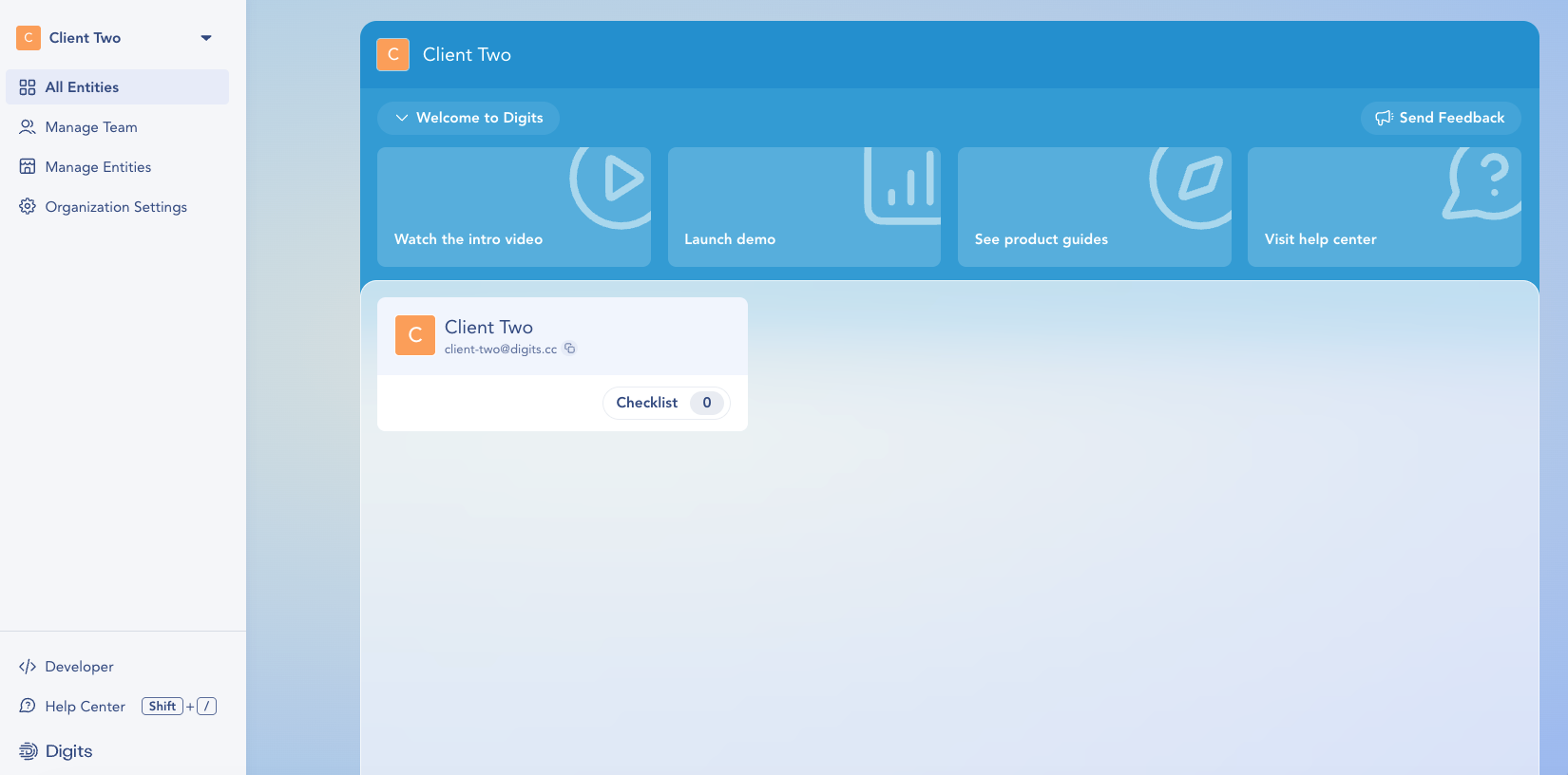
When one of your clients logs into Digits, they land on their **Organization Dashboard**. This is their account's home base—one level above any individual set of books. It's where *they* manage their businesses, their own team, and their organization settings.
Knowing this view helps you guide clients over the phone or in a screen-share and understand what they can (and can't) do on their side.
***
#### What Your Client Sees
The left navigation gives your client everything at the organization level:
* **All Entities** — Every business (entity) in their organization at a glance. This is the dashboard's home view; clicking a business opens its individual dashboard and the books.
* **Manage Team** — Where your client invites their own Team Members, sets roles, adjusts entity access, and removes people who have left.
* **Manage Entities** — Where your client adds and organizes the businesses under their organization.
* **Organization Settings** — Manage organization-wide details, including the **Organization Name** and **Organization Logo**. Clients who pay for their own subscription can also view their billing information here.
At the bottom, they'll also see quick links to the **Developer** API, the **Help Center** (or `Shift + /`), and Digits resources.
***
New clients see a **Welcome to Digits** banner with quick-start actions—**Watch the intro video**, **Launch demo**, **See product guides**, and **Visit help center**. Below it, each of their businesses appears as a card showing its name, email, and onboarding **Checklist** progress.
***
* Your client controls who has access to their organization. If a client asks you to add or remove one of *their* Team Members, point them to **Manage Team**—it's a client-side action.
* Adding your firm's own **Colleagues** happens separately, at the firm level (**Firm Dashboard → Firm Settings**), not from the client's organization dashboard.
* To view a client's financials, transactions, and reports, open one of their businesses to reach its **business dashboard**—the organization dashboard itself is for account management, not the books.
{% hint style="info" %}
**Reaching it from a business dashboard:** Your client can get back to their organization dashboard anytime by clicking **Settings → Go to Organization Settings**.
{% endhint %}
***
{% columns %}
{% column width="66.66666666666666%" valign="middle" %}
Got a question or feedback? Our team is all ears—come say hello!
{% endcolumn %}
{% column width="33.33333333333334%" valign="middle" %}
Contact Digits Support
{% endcolumn %}
{% endcolumns %}
***
---
# Agent Instructions
This documentation is published with GitBook. GitBook is the documentation platform designed so that both humans and AI agents can read, navigate, and reason over technical content effectively. Learn more at gitbook.com.
## Querying This Documentation
If you need additional information that is not directly available in this page, you can query the documentation by asking a question.
Perform an HTTP GET request on the following URL with the `ask` and `goal` query parameters:
```
GET https://help.digits.com/client-management/the-clients-organization-dashboard-what-your-clients-see.md?ask=&goal=
```
`ask` is the immediate question: it should be specific, self-contained, and written in natural language.
`goal` is what the user is ultimately trying to achieve, the reason they need the answer. Sharing it helps GitBook give you a better, more relevant answer. A goal is most helpful when it describes the outcome the user wants rather than restating the question. For example, with `ask=how do I create an API token`, a goal like `automate deployments from our CI pipeline` lets GitBook tailor the answer to that use case.
The response will contain a direct answer to the question and relevant excerpts and sources from the documentation.
Use this mechanism when the answer is not explicitly present in the current page, you need clarification or additional context, or you want to retrieve related documentation sections.